
itel 1508 FRP bypass Google Account Lock is a process of removing the lock from an Android device. This lock is placed by Google to prevent any unauthorized access to the device. However, sometimes users forget their Google account credentials and are unable to access their device. In such cases, it is necessary to bypass the lock in order to gain access to the device.
The FRP bypass process is very simple and only takes a few minutes to complete. This process will bypass the Google Account Lock on your itel 1508 phone. After completing this process, you will be able to use your phone as if you never had a Google Account Lock on it.
itel 1508 FRP bypass Google Account Lock is a process that allows you to remove the Google account lock from your itel 1508 phone. This is a useful method if you have forgotten your Google account password or if you have purchased a used phone that is locked to a previous owner’s account. The process is relatively simple and can be completed in a few minutes.
How to Reset FRP itel 1508
- Connect your HTC mobile to your Wi-Fi.
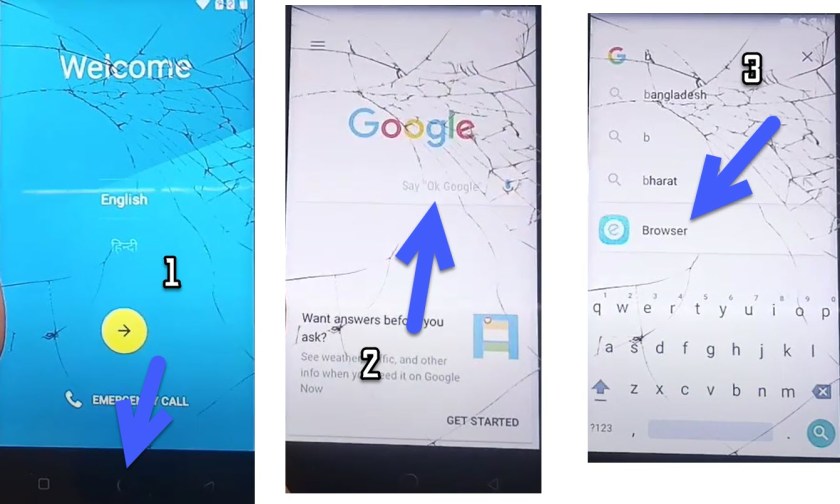
- Long tap on the circle button in the center to open the google app.
- Search for the browser and open it.

- A Google chrome page appears on the screen.
- Visit this link FRP APK and Download Android_5_GAM.apk & FRP_Bypassfrp APK:
- Install Android_5_GAM.apk and don’t open it
- Install FRP_Bypassfrp.apk and click on Open
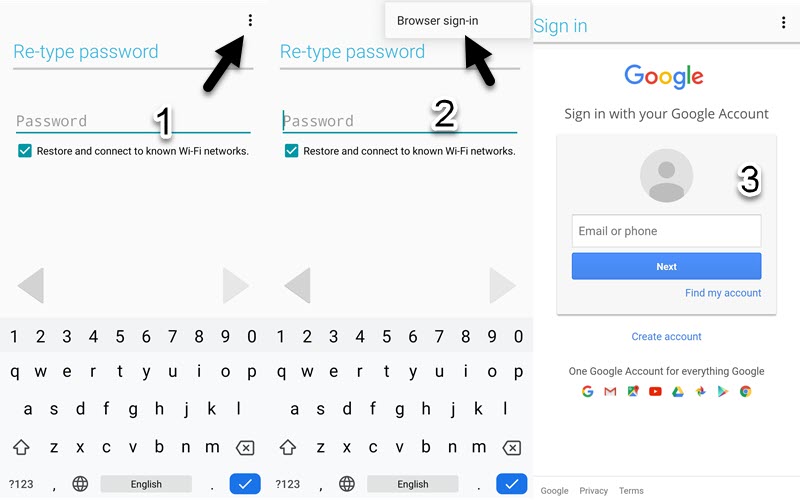
- Click on 3 dots upright & choose browser sign in.
- Sign in with your Gmail account.

- That’s it! Restart your itel 1508 & You have successfully bypassed FRP itel 1508 Unlock Gmail Android 5 Without a PC.
The itel 1508 FRP bypass Google Account Lock is a process of removing the lock from an Android device. This lock is placed by Google to prevent any unauthorized access to the device. However, sometimes users forget their Google account credentials and are unable to access their devices. In such cases, it is necessary to bypass the lock in order to gain access to the device.
Read more: Download Muslim Odin FRP Tool all versions